Onboard, Interview And Train Engineers On A Real Codebase.
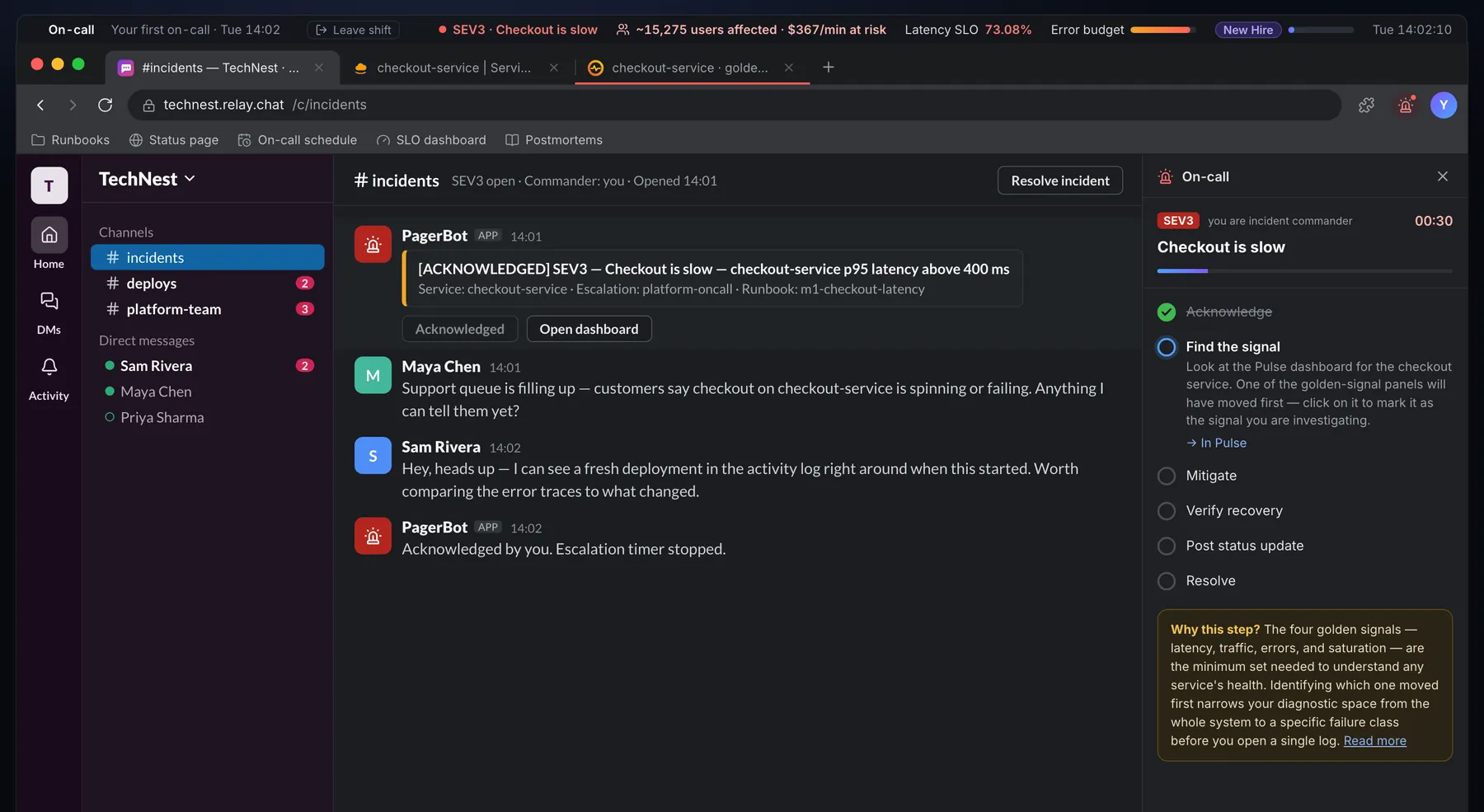
The same week for everyone: Slack, Jira, GitHub and VS Code in one Chrome tab, a Next.js codebase with hidden CI tests, and AI teammates. Use it before day one, as an interview, or as training.
Same 5 days for everyoneGraded S to CHidden CI testsNothing to installFlat price per team
Three Ways To Use It
One Week, Three Jobs.
Each use runs on the public Sim today. What's still in early access is the layer for you: team views, results and custom codebases.
Works today
Onboarding
Send new hires the Sim before their start date. They arrive knowing how tickets, CI and review fit together, so week one goes to your code instead.
Share the link. No account, nothing to install.
They play Monday to Friday at their own pace.
On day one, go through their end-of-day reports together.
Live today, over screen share
Coding interviews
Replace a puzzle round with a work sample: a customer bug, an unfamiliar codebase, CI and a reviewer. You see how someone works, not what they memorized.
The candidate plays Monday and Tuesday beforehand.
Live, they share their screen and work Wednesday's bug, SEAT-12.
Score it with the plan and signals below.
Works today · team view in early access
Training
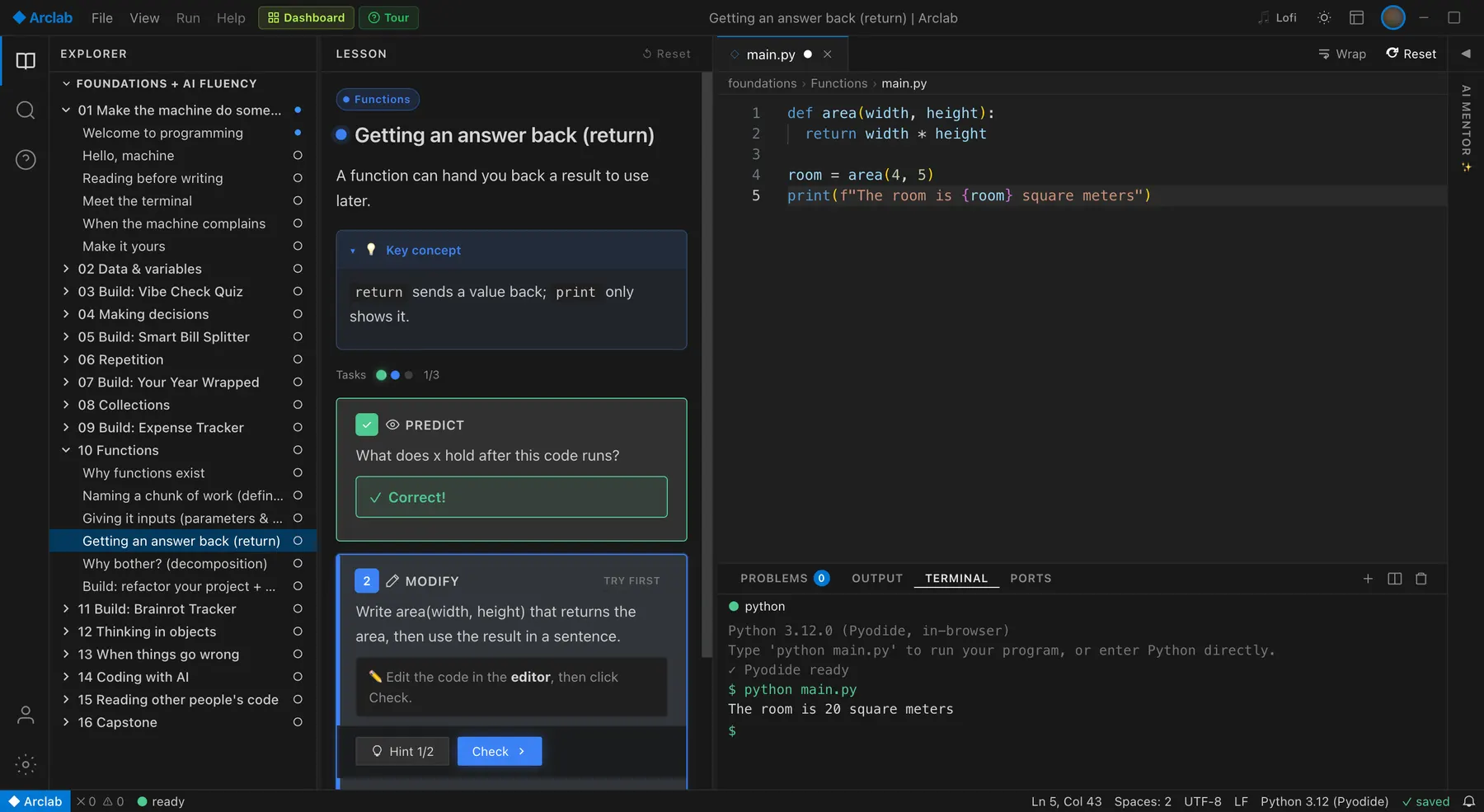
Give juniors, interns and apprentices a safe place to repeat the loop: read the ticket, reproduce, fix, push, read red CI, take review.
Run it as a weekly session or self-paced.
Start in Guided mode and move to Expert as they improve.
A team view of everyone's grades is in early access.
Work-Sample Interviews
Run A 60-Minute Interview On A Real Bug.
Most coding interviews test puzzles. The job is reading someone else's code, asking good questions and getting a red build to green. This plan uses Wednesday's ticket, SEAT-12, played live while the candidate shares their screen.
5m10m25m10m10m
1
Set up 5 min
The candidate opens the Sim in Chrome, already past Tuesday, and picks Expert mode in the Career menu.
2
Read and reproduce 10 min
They read SEAT-12 and reproduce the bug in the Seatly tab. Ask what they expect the fix to touch.
3
Fix and push 25 min
They find the rule, run the tests and open the pull request. CI is often red on the first push. Watch what they do next.
4
Review and explain 10 min
They read Dev's review and write the note to #support in plain words.
5
Debrief 10 min
Look at the end-of-day report together: score, CI runs, hints. Ask what they'd do differently.
=
60 minutes
What you watch
Where it shows up
Reads the ticket before the code
Jira, and the "Read the ticket" achievement
Reproduces before fixing
The booking they make in the Seatly tab
Asks good questions
Their Slack messages to Maya, Sam and Dev
Handles a red build
The failing checks on the PR, and their next change
Explains to a non-engineer
The note to #support, checked against a rubric
How much help they needed
Hints and red builds on the end-of-day report
Not built yet
Teammates will explain the fix if asked. That's by design: how a candidate asks is part of what you watch.
No interviewer dashboard or results link. The report lives in the candidate's browser, so review it on their screen.
One codebase today, in Next.js and TypeScript. Custom stacks and a dedicated interview mode are planned, not built.
Every screen below is from one real playthrough of SEAT-12, a customer bug. Scroll sideways through the whole loop: ask, read, find, push, fail, fix, get reviewed, merge.
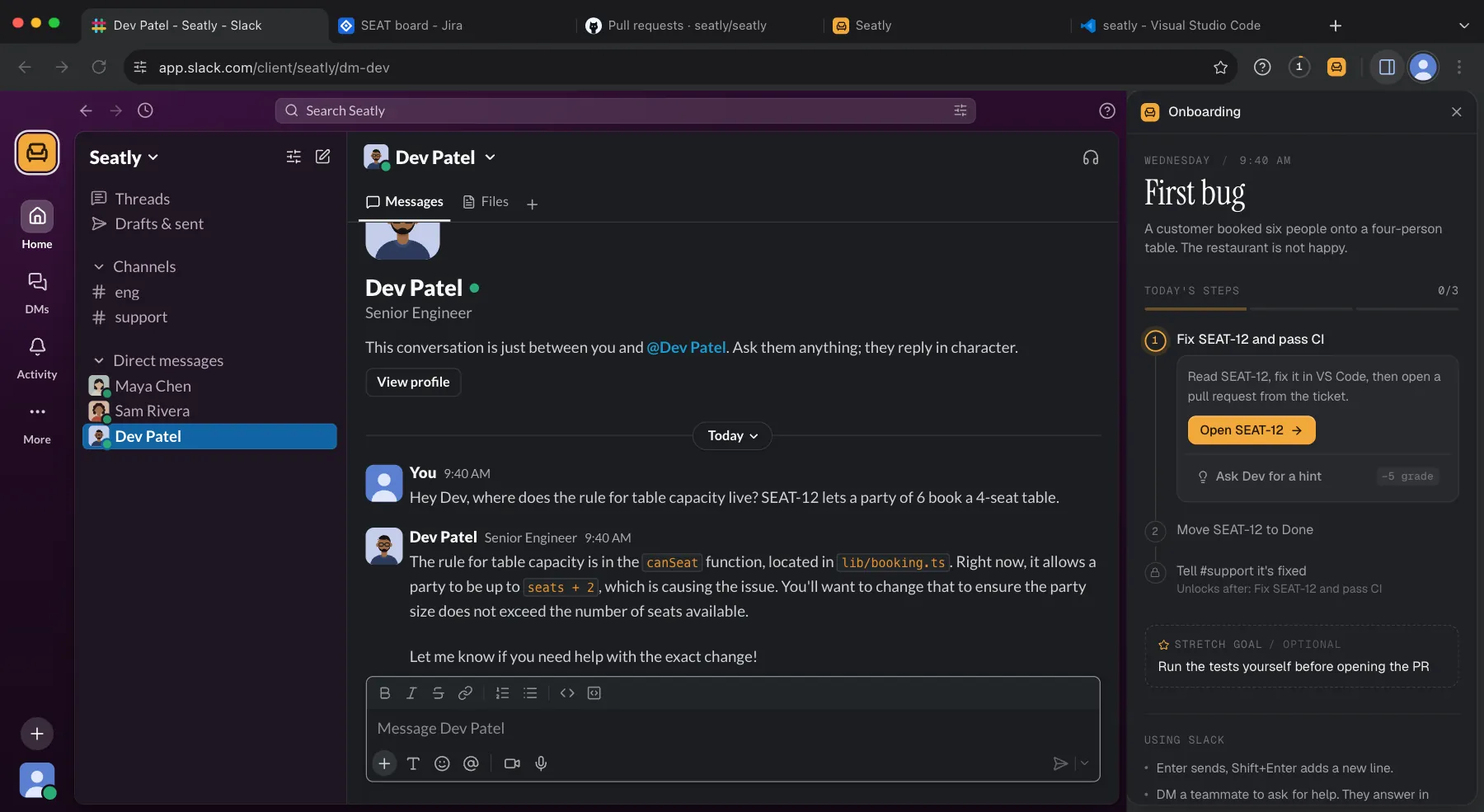
1Slack
Ask before you dig
You DM Dev, the senior engineer. He points you at canSeat() in lib/booking.ts. His reply is written live, in character.
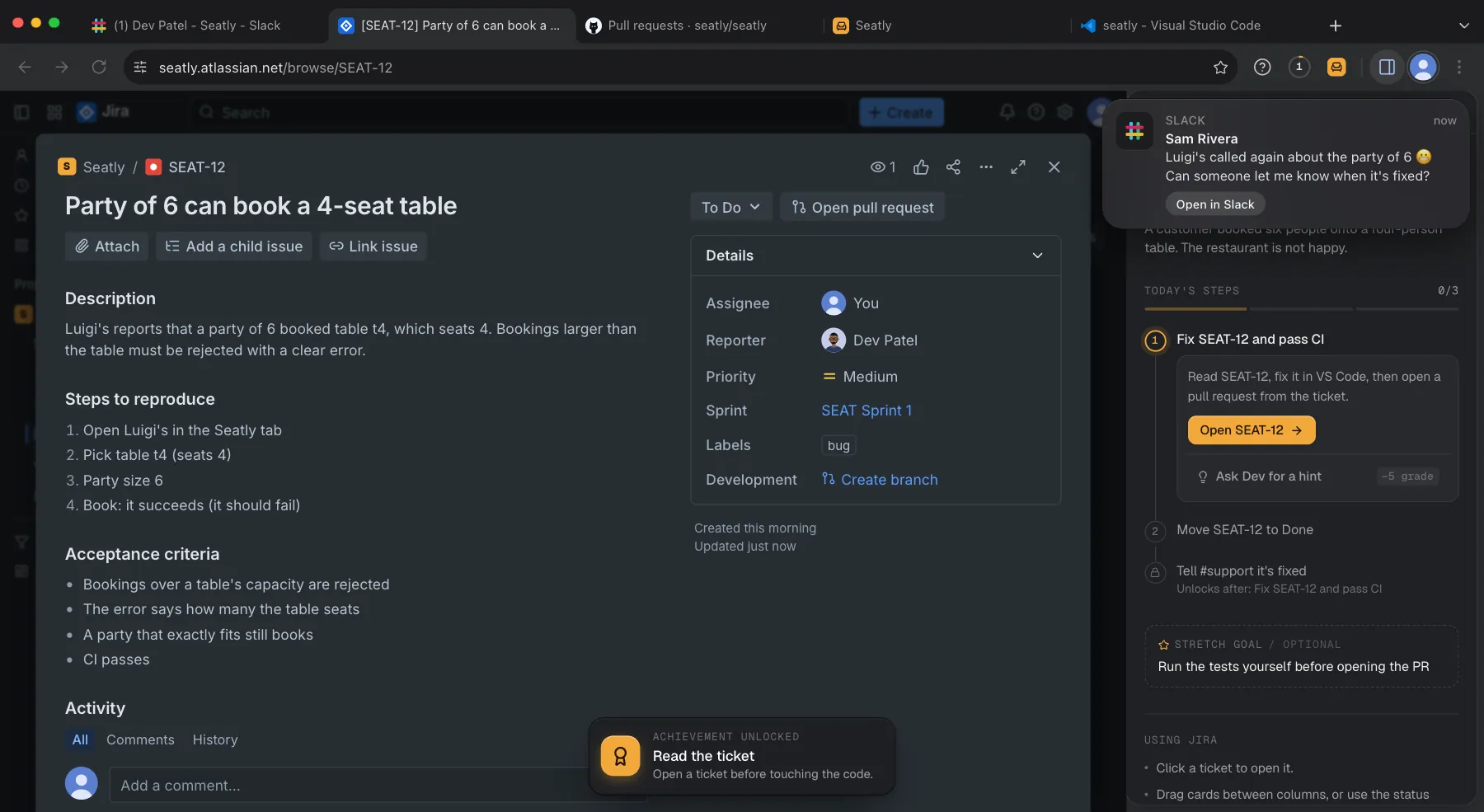
2Jira
Read the ticket
Steps to reproduce and acceptance criteria. While you read, Sam from support pings: the restaurant called again.
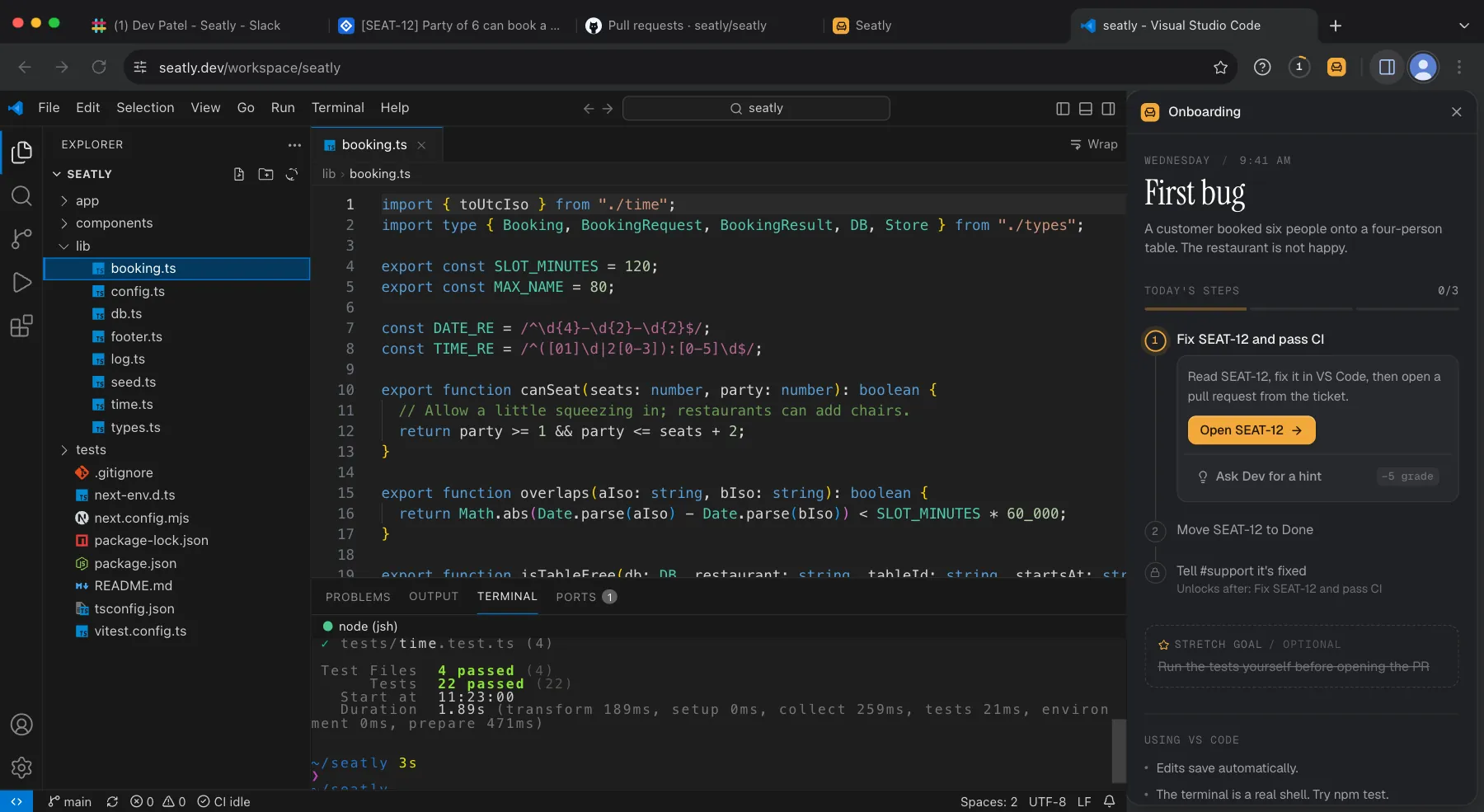
3VS Code
Find the rule, run the tests
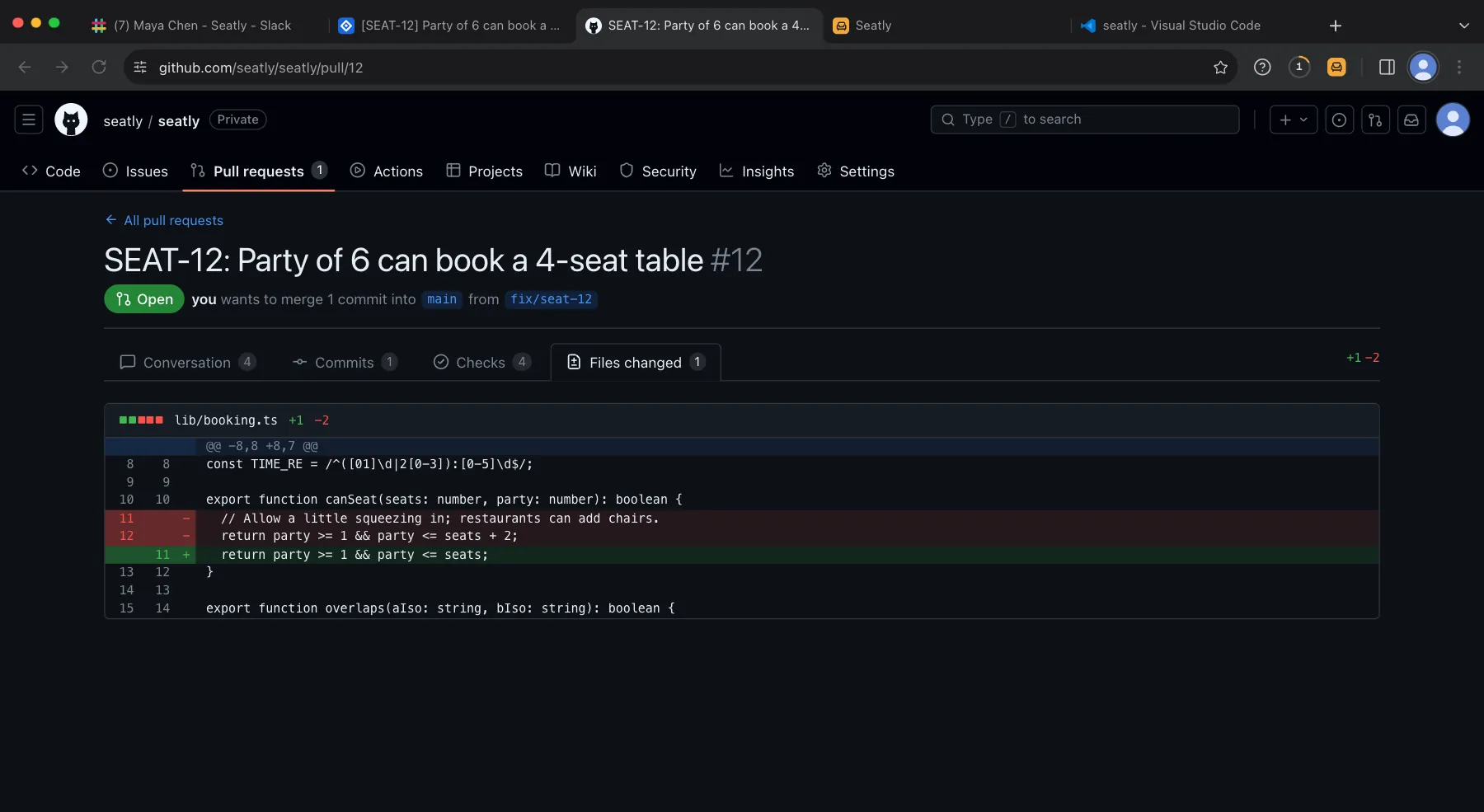
party <= seats + 2, because "restaurants can add chairs." npm test passes, 22 of 22. None of them test this.
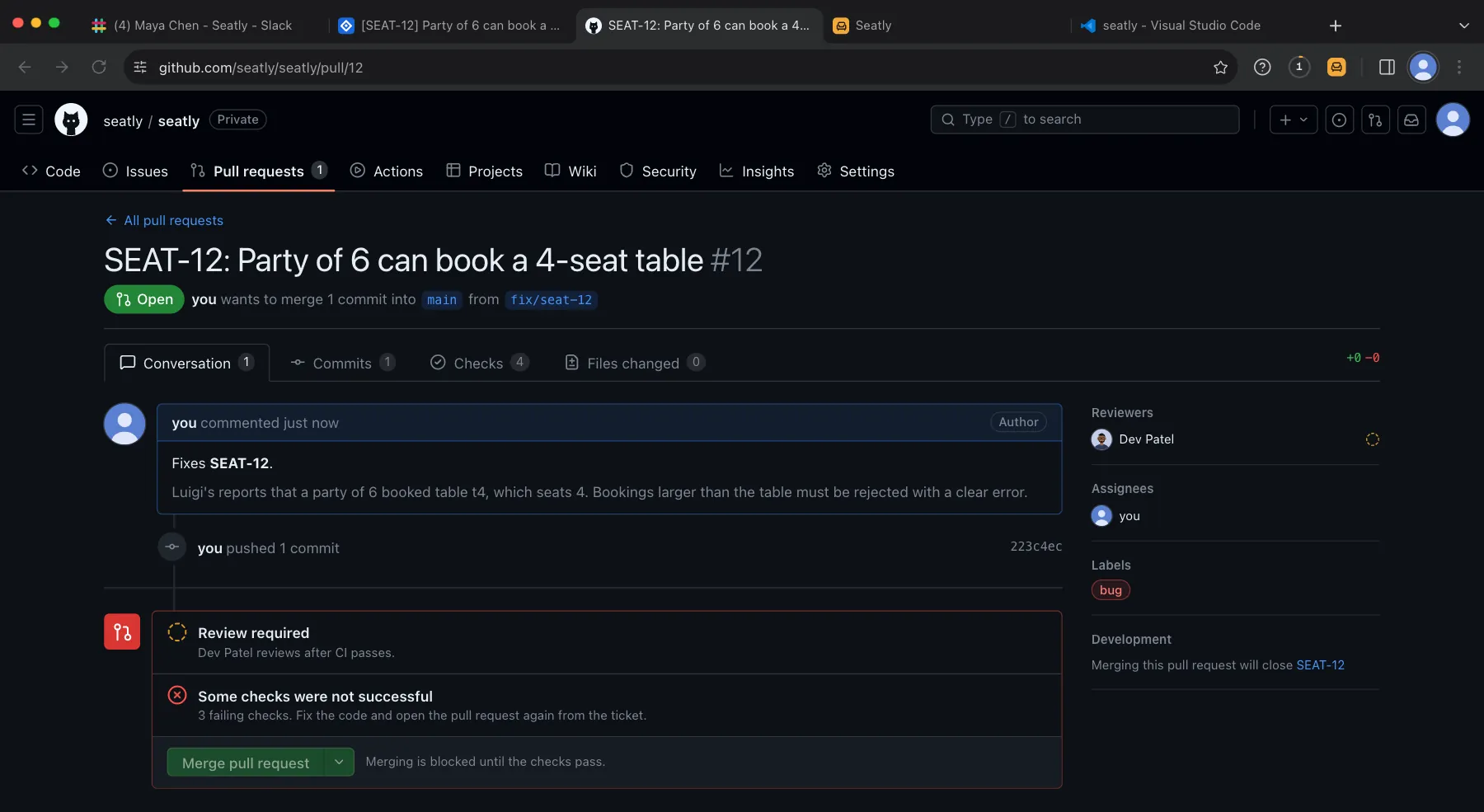
4GitHub
Open the PR. CI is red.
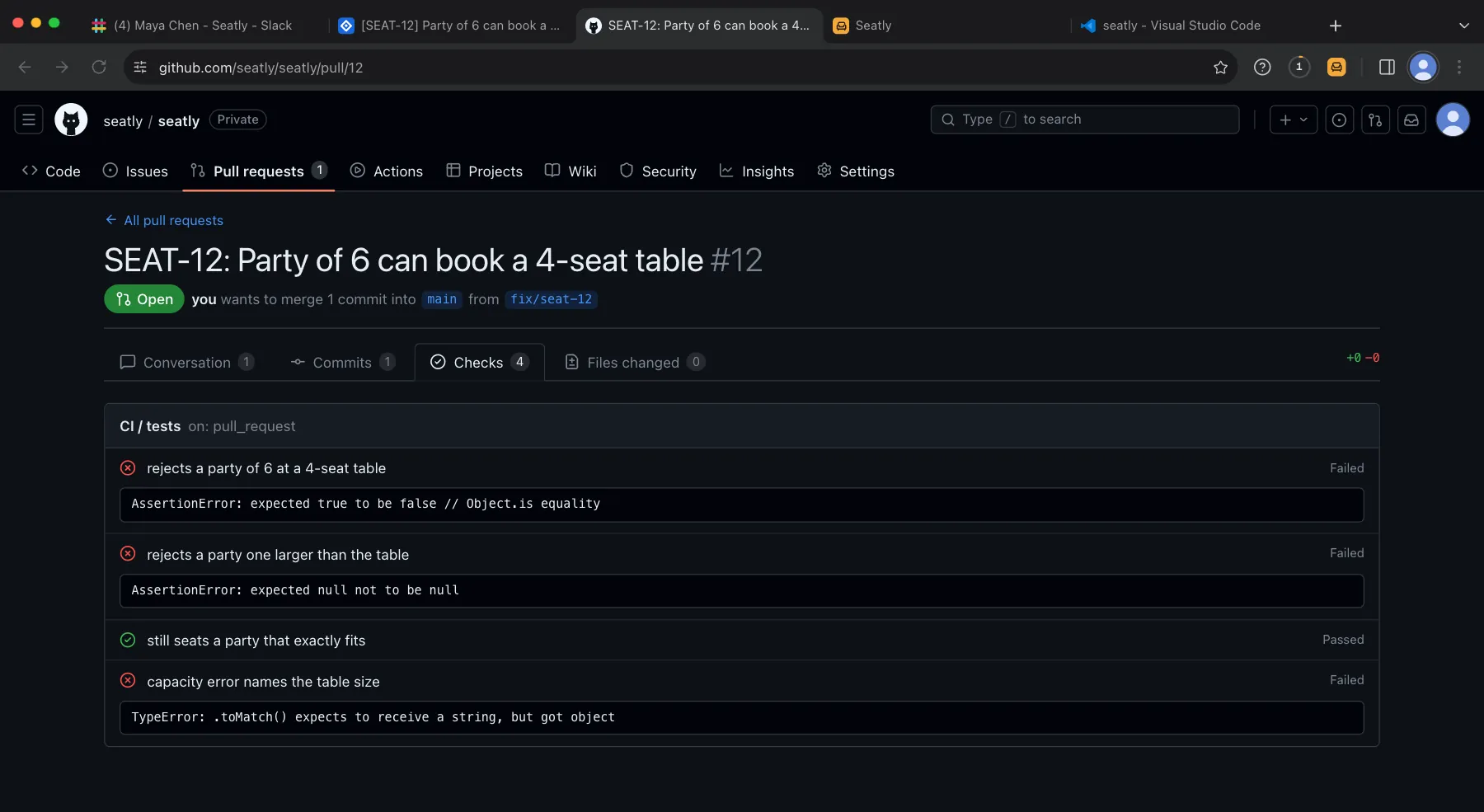
Hidden tests run as CI. Three fail, so merging is blocked until the checks pass.
5GitHub
Read the failing checks
"rejects a party of 6 at a 4-seat table": expected true to be false. The check names tell you what is still wrong.
6GitHub
Fix it in one line
Drop the + 2 and the comment that justified it. Open the pull request again.
7GitHub
Green, then review
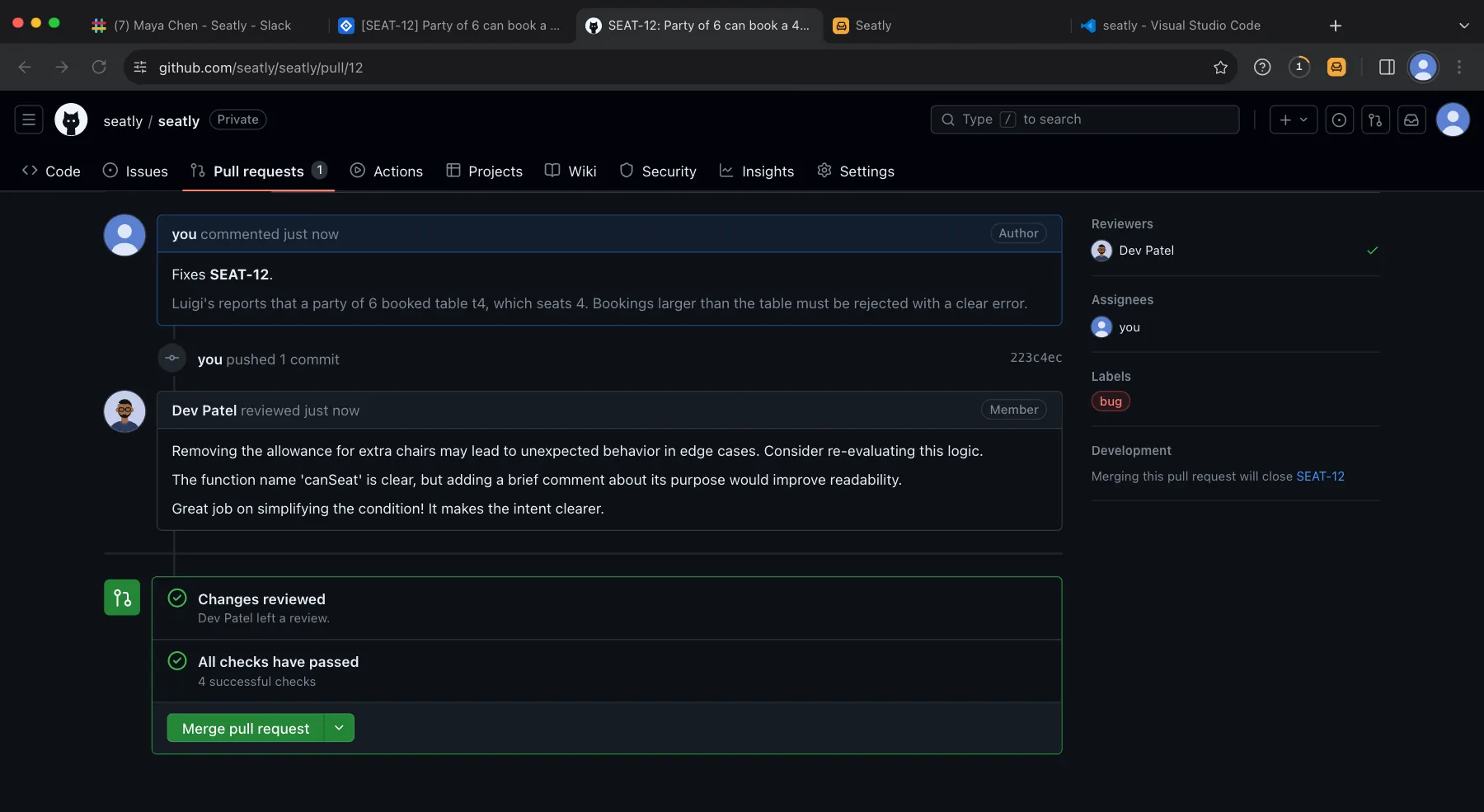
All four checks pass. Dev reviews the diff and leaves comments. Then you merge, and the ticket moves to Done.
8Report
End of day
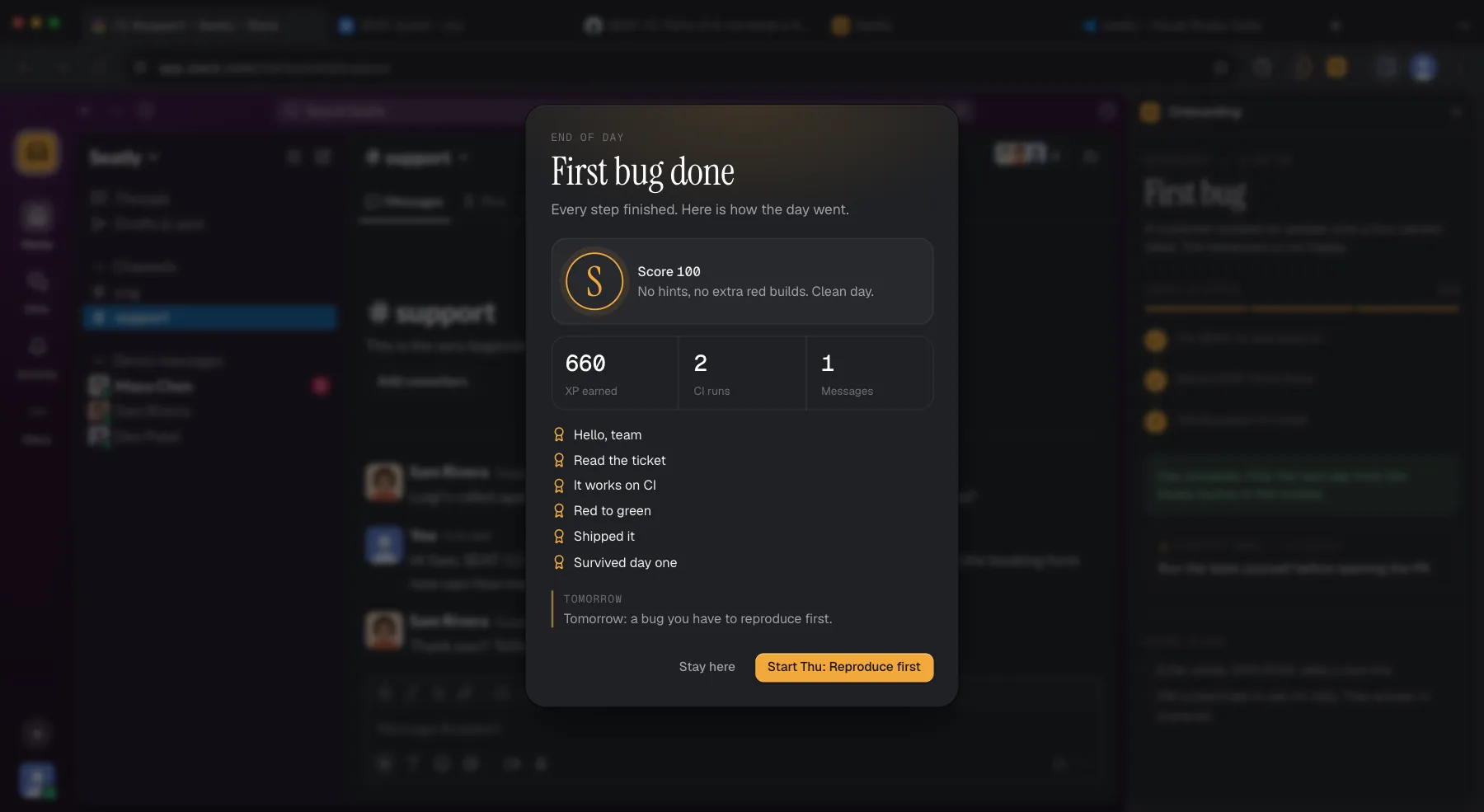
Score 100, grade S: no hints and no extra red builds. 660 XP and the achievements you earned.
Unedited captures of the Sim in Chrome, 1 October 2026. Teammate replies and code review are written by AI each time, so yours will read differently.
How It Compares
A Work Sample, Not A Puzzle.
Feature
Sim work sample
Algorithm puzzle
Take-home project
Pairing on your code
Looks like the real job
-
partly
Same task for every candidate
-
Nothing for the candidate to set up
-
-
Tests check the fix automatically
-
-
Keeps your own code private
-
Shows how they ask for help
-
-
Fits in an hour
-
Puzzles test something real. They just test less of the job.
For
Engineering managers
A shorter road to a new hire's first merged PR, and a fairer interview round.
Interviewers and recruiters
One realistic task for every candidate, with clear things to watch.
Onboarding and L&D
A hands-on first week that is the same for every hire.
Apprenticeship programs
A safe place to practice the loop before touching production.
Questions.
What is a developer onboarding simulation?
A realistic rehearsal of a new engineer's first week: a real codebase, tickets, CI and review from simulated teammates, in the browser.
Can we use it for coding interviews?
Yes, as a live work-sample round over screen share, using the plan on this page. There's no proctoring, interviewer dashboard or results link yet, and teammates help if asked, so it's built for a conversation with a candidate, not an unsupervised test.
Is it an alternative to LeetCode-style interviews?
It tests different things: reading unfamiliar code, reproducing a bug, reading red CI, taking review and explaining a change. Many teams will want it alongside other rounds, not instead of all of them.
What is available today?
The five-day first week in Next.js and TypeScript, graded each day, free to play. A team view of results is in early access, and more stacks are built with early-access teams.
Do hires or candidates need an account?
No. They open the Sim in Chrome or Edge and start. Progress saves in their browser.
What stack does it use?
Next.js, TypeScript, Node and Vitest, with hidden tests as CI. Custom stacks are on the roadmap.
What does early access cost?
A flat monthly price per team, no per-seat fees. Confirmed before you commit.
 Arclab